
API keys allow you to securely access Deben APIs from external systems or applications.
Each key is linked to your account and restricted by specific scopes that define what data and actions the key can access.
🧩 1. Prerequisites
Before creating an API key, ensure that:
- You have a valid Deben Portal account
- Your account has Developer or Administrator permissions
- You are using a standard browser mode (not private/incognito) with cookies enabled
🔐 2. Logging into the Deben Portal
- Visit the Deben Portal
- Log in using your registered credentials
- From the sidebar menu, navigate to Developer → API Keys
🪄 3. Creating an API Key
To create a new API key:
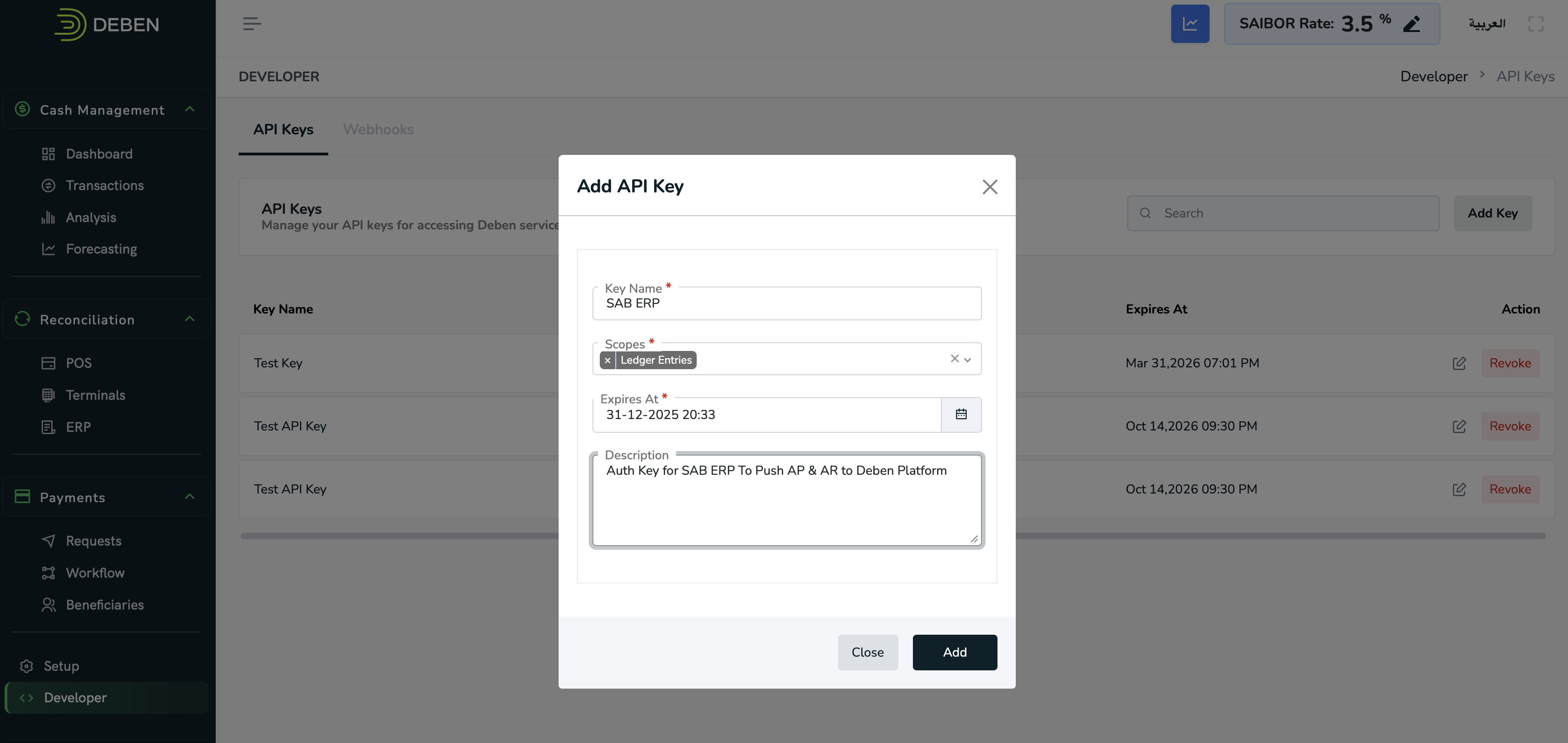
- Click Add Key in the top-right corner
- In the Add API Key dialog:
- Key Name → Provide a descriptive name (e.g.,
ERP Integration Key) - Scopes → Select one or more scopes your integration needs:
BeneficiariesLedger EntriesMerchant OrdersPayment Requests
- Expires At → Set the expiration date/time
- Description → Optionally describe the purpose of this key
- Key Name → Provide a descriptive name (e.g.,
- Click Add to generate your key
📋 4. Viewing Your API Key
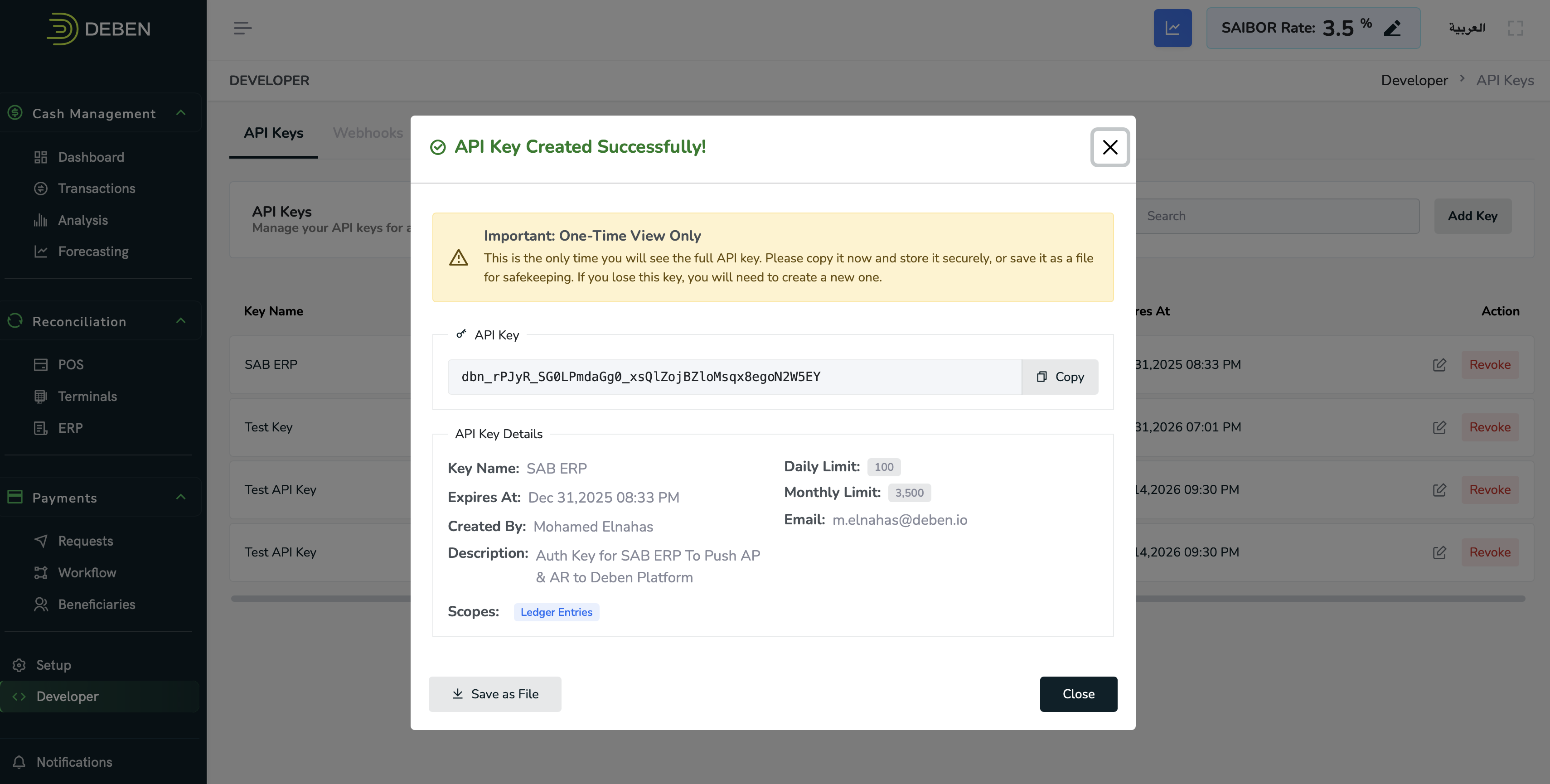
Once created, a confirmation dialog appears:
- Your API key will be displayed only once
- Copy it immediately or click Save as File to securely store it
- After closing, the key will not be viewable again
Important: If you lose your key, you must generate a new one.
🧾 5. API Key Details
Each API key record includes:
- Key Name
- Created By and Email
- Expiration Date
- Daily and Monthly Usage Limits
- Assigned Scopes
You can revoke any active key at any time by clicking Revoke next to it.
🛡️ 6. Security Best Practices
- 🔒 Treat your API key like a password — never share or expose it publicly
- 🔁 Rotate keys regularly and revoke unused or compromised keys
- 🎯 Use scoped keys — grant only the permissions your integration requires
- 🌐 Always use HTTPS when calling Deben APIs
- 🧱 Store keys securely using environment variables or secret managers (e.g., AWS Secrets Manager, Google Secret Manager)
Following these best practices ensures your integrations remain safe and compliant.
🧹 7. Revoking an API Key
If you need to deactivate or remove an existing key:
- Navigate to Developer → API Keys in the Deben Portal
- Locate the key you want to deactivate
- Click Revoke
- Confirm your action when prompted
Once revoked, the key becomes inactive immediately and cannot be reused for future API requests.
🧪 8. Example Integration (cURL)
Here’s an example of making a Deben API request using your API key:
curl -X GET "https://api.deben.io/v1/merchant-orders" \
  -H "Authorization: ApiKey dbn_QiNGZI40L0QyPqPMUXKhp2tTAYNsFJuaNhLrxu0q7HE" \
  -H "Content-Type: application/json"
Updated 12 months ago
Did this page help you?